Wanderworld
A shared pixel world where characters move around and talk. The backend handles everything — you build the frontend.
What is Wanderworld?
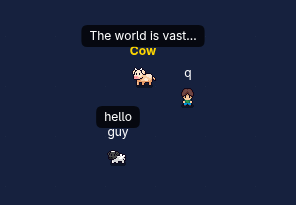
Wanderworld is an always-on shared world. There are no turns, no winning, no losing — just characters hanging out in a shared world. Players join at a random spot, move around, and say things via speech bubbles.
A friendly Cow wanders the world by default, greeting newcomers. Players who go inactive for 10 minutes are automatically removed.
It runs on SDB infrastructure: create a Wanderworld database from the dashboard,
then interact via POST
and GET
requests.
What You'll Build
Three things to get a working world:
-
Connect to the world
— use our shared world at
/sdb/poly/wander, or create your own through the SDB Dashboard. -
Render the world — fetch the game state with a GET request and
show each player using HTML elements with
position: absolute. - Implement actions — send POST requests to join, move your character, and say things.
Rendering the World
The server gives you player positions and messages. Your job is to show them on screen using HTML elements positioned with CSS.
1 Fetch the world state
Use fetch
to GET your game URL. The response has the map dimensions and a
players
array:
{
  "map_width": 800,
  "map_height": 600,
  "players": [
    {
      "username": "Cow",
      "x": 402,
      "y": 298,
      "message": "Welcome, traveler",
      "image": "/sdb_apps/wanderworld/images/cow.png",
      "width": 32,
      "height": 32
    },
    {
      "username": "alice",
      "x": 150,
      "y": 200,
      "message": "hello!",
      "image": "/sdb_apps/wanderworld/images/player.png",
      "width": 32,
      "height": 32
    }
  ]
}
2 Show each player
Create a container div
with
position: relative
— this is your world.
Then use a
for...of loop
to go through state.players
and for each player,
create a div
with position: absolute.
Set its left
and top
to the player's x
and y.
Inside each player div, add an
<img>
using the player's image
URL and
append it
to the div.
Add a text element for their username, and
if
they have a message
(not null),
a speech bubble element with the text.
Use image-rendering: pixelated
on the images to keep the pixel art crisp.
3 Keep it updated
Use
setInterval
to fetch the state every 1 second and re-render. Clear the container
(set innerHTML = "")
before each render.
API Reference
All actions use POST /sdb/:namespace/:db_name.
World state is fetched with GET /sdb/:namespace/:db_name.
GET World State
Fetch the current world. Returns map dimensions and all players (including the Cow NPC). Poll every 1 second.
// GET /sdb/:namespace/:db_name

// Response
{
  "map_width": 800,
  "map_height": 600,
  "players": [
    { "username": "Cow", "x": 400, "y": 300, "message": "Welcome, traveler", "image": "/sdb_apps/wanderworld/images/cow.png", "width": 32, "height": 32 },
    { "username": "alice", "x": 150, "y": 200, "message": null, "image": "/sdb_apps/wanderworld/images/player.png", "width": 32, "height": 32 }
  ]
}
POST Join
Join the world. Your character spawns at a random position.
Save the player_key
— you need it for move and talk.
The server automatically assigns a character sprite from the
built-in pixel art assets.
// Request
{
  "action": "join",
  "username": "alice"
}

// Response (save the player_key!)
{
  "ok": true,
  "player_key": "a1b2c3d4..."
}
POST Move
Move your character to a new position. Click anywhere on the map and your character teleports there. Moves are applied on the next server tick (every 1 second). If you send multiple moves within a second, only the last one counts.
// Request
{
  "action": "move",
  "player_key": "a1b2c3d4...",
  "x": 155,
  "y": 203
}

// Response
{ "ok": true }
POST Talk
Say something. Your message appears as a speech bubble for 10 seconds. Max 200 characters. Like moves, talk is applied on the next tick. Sending a new message overwrites the previous pending one.
// Request
{
  "action": "talk",
  "player_key": "a1b2c3d4...",
  "message": "Hello everyone!"
}

// Response
{ "ok": true }
Error Responses
When something goes wrong, the server returns HTTP 400 with a JSON body:
| Error | When |
|---|---|
invalid_player |
Bad or expired player_key |
out_of_bounds |
Target is outside the map (0-800, 0-600) |
username_taken |
Another player has that name |
invalid_username |
Empty, too long (max 20), or reserved ("Cow") |
message_too_long |
Message exceeds 200 characters |
Game Rules
All rules are enforced by the server. This is just for reference.
Movement
- Click anywhere on the map and your character moves there
- Must stay within map bounds (0-800, 0-600)
- Moves are throttled: 1 per second per player
Speech
- Messages appear as speech bubbles for 10 seconds
- Max 200 characters
- Throttled: 1 per second per player
Inactivity
- Players who don't send any action for 10 minutes are removed
- Join again to come back
The Cow
- An NPC cow that wanders the map and says things
- Always present — you don't need to do anything special for it
- Shows up in the players array like any other player
FAQ
My actions don't work
When an action fails, the server always responds with an error message in the JSON body.
Use console.log()
or alert()
to display the response from the server and figure out the problem.
See the Error Responses table above for all possible errors.
My actions don't work after refresh
When you refresh the page, you lose the
player_key
that was stored in your JavaScript variable. Without it, the server doesn't know who you are.
Save your player_key
to
localStorage
right after joining, and load it back when the page loads. That way a refresh
won't break your game.
How do I position players on the map?
Give your world container
position: relative
and a fixed
width/height matching the map size. Then for each player, create a
div
with position: absolute
and set left
and top
to the player's x
and y
values.
How do I show speech bubbles?
Check if the player's message
is not null. If they have one, create a small
div
above the player with
the text, a background color, some padding, and a border-radius to make it
look like a bubble. Position it with CSS relative to the player element.
My player disappeared
Players who don't send any action (move or talk) for 10 minutes are automatically removed. Just join again. If you want to stay in the world while idle, you could send a small move on a timer to keep your session alive.
I need to reset my database
Go to the SDB Dashboard, open your database settings, and reset the game. This removes all players and starts fresh.
Assets
The server assigns each player a character sprite automatically. The
image
field in the GET response is a URL to a PNG you can use directly as an
<img>
src.
All sprites are pixel art — render them at 32x32 or larger with image-rendering: pixelated.
Available Sprites
These are the sprites the server cycles through. You can also use any of the other assets below to decorate your world.


Decoration & Tiles
Use these to build out your world's look. All available at /sdb_apps/wanderworld/images/.