Antiyoy
A multiplayer hex-grid territory game. The backend handles all game logic — you build the frontend.
What is Antiyoy?
Antiyoy is a strategy game where players compete to conquer a hex grid — buying units, capturing territory, building farms for income, and defending with towers and fortresses. Download the original to try it out: Android, iOS.
We're cloning this game as a multiplayer web version. All the complex rules run on the server — your job is to build the frontend that lets players join and play.
It runs on top of SDB infrastructure: create an Antiyoy database from the dashboard,
then interact with it via POST
and GET
requests.
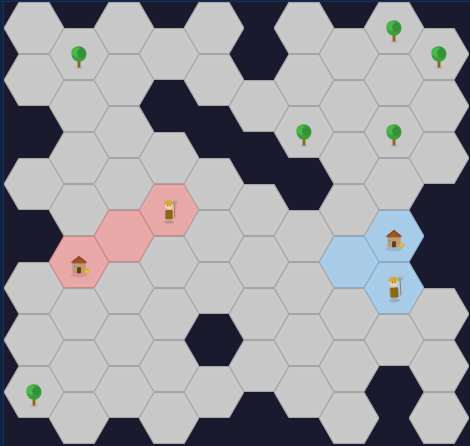
What You'll Build
Three things to get a working game:
- Create a database — go to the Dashboard, click "Create Database", and select Antiyoy as the type. If your teacher already created one, use their namespace and database name instead.
- Render the map — fetch the game state with a GET request and draw the hex grid on screen using the pixel positions and image URLs the server provides.
- Implement actions — send POST requests to join the game, start it, move units, buy units/buildings, and end your turn.
Rendering the Map
The server gives you everything you need to draw the map — pixel positions, image URLs, and overlay info. Your job is to fetch that data and turn it into visible elements on the page.
1 Fetch the game state
Use fetch
to GET your game URL. You'll need
async/await
to wait for the response. It contains a
map
array — each entry is one hex on the grid:
// GET /sdb/my-namespace/my-game
{
  "phase": "playing",
  "map": [
    {"type": "land", "unit": null, ...},
    {"type": "land", "unit": "peasant", ...},
    {"type": "impassable", "unit": null, ...},
    // ... 300 hexes total
  ],
  // ...more keys (see API Reference below)
}
Here's what a single hex looks like:
{
  "type": "land",                        // "land" or "impassable"
  "col": 1,                              // grid column (for actions)
  "row": 0,                              // grid row (for actions)
  "x": 45,                               // pixel position from left
  "y": 26,                               // pixel position from top
  "width": 60,                           // hex width in pixels
  "height": 52,                          // hex height in pixels
  "owner": "alice",                      // player name, or null
  "image": "/sdb_apps/antiyoy/images/hex_red.svg",       // hex background image
  "unit": "peasant",                     // unit type, or null
  "unit_image": "/sdb_apps/antiyoy/images/unit_peasant.svg",  // unit overlay, or null
  "building": null,                      // building type, or null
  "building_image": null                 // building overlay, or null
}
2 Loop through the map and show tiles
Use a
for-of loop
over state.map.
For each hex (skip ones where
type
is "impassable"), create an element,
set its src
to hex.image
(like an img tag),
and
append it
to your container.
Positioning:
each hex already has x
and y
pixel values. Use
CSS absolute positioning
to place each hex at the right spot.
The container needs position: relative,
and each hex element gets
position: absolute
with left
= hex.x and top
= hex.y.
3 Add overlays (units and buildings)
Each hex can have a unit_image
and/or a building_image.
These are null
when empty,
or a URL like /sdb_apps/antiyoy/images/unit_peasant.svg.
Use an
if statement
to check if the value is not null. If it isn't, add another
<img>
on top of the hex background, positioned inside the same hex container.
4 Keep it updated
To see other players' moves, use setInterval to fetch the game state every 1-2 seconds and re-render the map.
⚠ You MUST clear the map container before re-rendering!
Each render adds 300 hex elements. If you don't remove the old ones first
(e.g. container.innerHTML = ""),
they pile up and your browser will freeze within seconds.
API Reference
All actions use POST /sdb/:namespace/:db_name.
Game state is fetched with GET /sdb/:namespace/:db_name.
GET Game State
Fetch the current game state. Use this to render the map, show the lobby, display player info, and check whose turn it is. Poll every 1-2 seconds to keep the UI updated.
// GET /sdb/my-namespace/my-game
{
  "phase": "playing",
  "turn": 5,
  "current_player": "alice",
  "turn_deadline": "2026-03-14T10:00:15Z",
  "players": [
    {"username": "alice", "money": 23, "income": 8, "upkeep": 4}
  ],
  "map": [
    {"col": 0, "row": 0, "x": 0,  "y": 0,  "width": 60, "height": 52, "type": "land", "owner": null,
     "unit": null, "building": null,
     "image": "/sdb_apps/antiyoy/images/hex_neutral.svg", "unit_image": null, "building_image": null},
    {"col": 1, "row": 0, "x": 45, "y": 26, "width": 60, "height": 52, "type": "land", "owner": "alice",
     "unit": "peasant", "building": null,
     "image": "/sdb_apps/antiyoy/images/hex_red.svg", "unit_image": "/sdb_apps/antiyoy/images/unit_peasant.svg", "building_image": null},
    {"col": 2, "row": 0, "x": 90, "y": 0,  "width": 60, "height": 52, "type": "land", "owner": "alice",
     "unit": null, "building": "farm",
     "image": "/sdb_apps/antiyoy/images/hex_red.svg", "unit_image": null, "building_image": "/sdb_apps/antiyoy/images/building_farm.svg"}
  ],
  "winner": null,
  "last_winner": "alice"
}
POST Join
Join the lobby before the game starts. Save the
player_key
from the
response — you need it for every other action.
// Request
{
  "action": "join",
  "username": "alice"
}

// Response (save the player_key!)
{
  "ok": true,
  "player_key": "a1b2c3d4e5f6..."
}
POST Start
Start the game once enough players have joined (1-6). The minimum player count
is configurable in database settings (default 1). Anyone in the lobby can send this.
The phase switches from lobby
to playing, the map is
generated with starting territories, and the first player's turn begins.
// Request
{
  "action": "start"
}

// Response
{ "ok": true }
POST Move
Move a unit from one hex to another during your turn. Units can move up to
4 hexes through your own territory and 1 hex into enemy or neutral land.
Use col
/ row
from the map data.
// Request
{
  "action": "move",
  "player_key": "a1b2c3...",
  "from": { "col": 3, "row": 5 },
  "to": { "col": 4, "row": 5 }
}

// Response
{ "ok": true }
POST Buy
Buy a unit or building and place it on one of your hexes during your turn. Units can only be placed on empty hexes. Check the Game Rules section for costs and types.
// Request
// type: peasant, spearman, knight, baron, farm, tower, fortress
{
  "action": "buy",
  "player_key": "a1b2c3...",
  "type": "peasant",
  "hex": { "col": 3, "row": 5 }
}

// Response
{ "ok": true }
POST End Turn
End your turn when you're done moving and buying. The turn passes to the next player. If a turn timer is configured, inactivity will auto-forfeit your turn. The timer is configurable in database settings (disabled by default).
// Request
{
  "action": "end_turn",
  "player_key": "a1b2c3..."
}

// Response
{ "ok": true }
POST Surrender
Give up and leave the game. All your territory becomes neutral and your units and buildings are removed. If it was your turn, it passes to the next player.
// Request
{
  "action": "surrender",
  "player_key": "a1b2c3..."
}

// Response
{ "ok": true }
Error Responses
When something goes wrong, the server returns HTTP 400 with a JSON body explaining what happened. For example, trying to buy a unit you can't afford:
// Request
{
  "action": "buy",
  "player_key": "a1b2c3...",
  "type": "knight",
  "hex": { "col": 3, "row": 5 }
}

// Response (HTTP 400)
{
  "error": "cannot_afford"
}
Possible errors:
| Error | When |
|---|---|
not_your_turn |
Action sent by wrong player |
invalid_move |
Move is blocked or unreachable |
cannot_afford |
Not enough money (includes cost and money) |
game_not_started |
Action requires playing phase |
lobby_full |
Already 6 players in lobby |
username_taken |
Another player has that name |
invalid_hex |
Hex does not exist or is impassable |
unit_already_moved |
Unit already moved this turn |
hex_occupied |
Hex already has a unit or building |
Game Rules
All rules are enforced by the server — you don't need to implement any of this. This section is just for reference, so you understand how the game works and can build a more informative UI (e.g. showing costs, income, or who's winning). To get a feel for the game, download the original (Android, iOS).
Game Phases
- Lobby — players join (1-6, minimum is configurable), anyone can start the game
- Playing — sequential turns in join order
-
When a player wins, the winner is stored in
last_winnerand the game returns to lobby
Turn Flow
- Collect income: +1 per owned hex (0 if hex has tree), +4 per farm
- Pay upkeep: peasant=2, spearman=6, knight=18, baron=36
- If money goes negative: all your units die, money resets to 0
- Take actions: move units, buy units/buildings, then end your turn
- If a turn timer is set, inactivity auto-forfeits your turn (configurable, disabled by default)
Units
| Unit | Level | Cost | Upkeep | Captures |
|---|---|---|---|---|
| Peasant | 1 | 10 | 2 | Empty land, trees |
| Spearman | 2 | 20 | 6 | Above + peasants |
| Baron | 3 | 30 | 18 | Above + spearmen, towers |
| Knight | 4 | 40 | 36 | Above + barons, fortresses |
Units move up to 4 hexes through own territory and 1 hex into neutral/enemy territory. Each unit moves once per turn. Moving onto a friendly hex with a lower-level unit merges them (peasant + peasant = spearman, etc.).
Buildings
| Building | Cost | Effect |
|---|---|---|
| Farm | 12 + 2 per farm you own | +4 income per turn |
| Tower | 15 | Defends adjacent hexes at level 2 |
| Fortress | 35 | Defends adjacent hexes at level 3 |
Buildings are placed on any owned hex without a unit or building. They are destroyed when the hex is captured. Buildings cannot move.
Economy
- Each owned hex gives +1 income
- Each farm gives +4 income
- Hexes with trees give 0 income (not +1)
- Unit upkeep is paid each turn
- Net income = hex income + farm income - unit upkeep
Protection
Units, towers, and fortresses protect adjacent hexes. An attacker must have a higher level than the highest adjacent protector. Protection does not stack.
Trees
Trees start on neutral hexes and spread every 2-6 turns to adjacent neutral land. A hex with a tree produces 0 income. Send a peasant to chop it (move onto the tree hex).
Connectivity
At the end of each turn, your territory is checked for connectivity. If your territory splits into disconnected chunks, only the largest chunk survives — smaller chunks become neutral and all units/buildings on them are destroyed.
Win Conditions
- Domination — own 70% or more of habitable hexes
- Elimination — a player who loses all their land is eliminated
- Last standing — if only one non-eliminated player remains, they win
FAQ
My actions don't work
When an action fails, the server always responds with an error message in the JSON body.
Use console.log()
or alert()
to display the response from the server and figure out the problem.
See the Error Responses table above for all possible errors.
My actions don't work after refresh
When you refresh the page, you lose the
player_key
that was stored in your JavaScript variable. Without it, the server doesn't know who you are.
Save your player_key
to
localStorage
right after joining, and load it back when the page loads. That way a refresh
won't break your game.
Clicking on a unit doesn't select the hex tile
Your click event is set up on the hex tile, but the unit is a separate image sitting on top of it. When you click, the browser fires the event on the unit image instead of the hex behind it. Use pointer-events: none on your overlay images (units and buildings) so that clicks pass through to the hex tile underneath.
How to highlight a hex so it looks good
Use the CSS
filter
property with brightness().
For example,
filter: brightness(1.3)
makes a hex 30% brighter — great for hover effects or showing a selected tile.
How do I know which hex was clicked?
Two approaches:
-
Use
dataset
— when creating each hex element, store the
colandrowfrom the data on the element (e.g.el.dataset.col = hex.col). Then read them back in your click handler. -
Use
addEventListener
— attach the click handler to each hex right when you create it in the loop.
The hex variable is captured in the callback, so you already have access to
hex.colandhex.row.
My game is stuck in 'playing' mode so I can't join
Go to the SDB Dashboard, open your database settings, and reset the game. This puts it back into lobby mode.
Assets
All SVG assets are served from your SDB server. The full URL is your server address
plus the path — for example: https://sdb.tinkr.is/sdb_apps/antiyoy/images/hex_red.svg.
Use them in your frontend with <img src="https://sdb.tinkr.is/sdb_apps/antiyoy/images/hex_red.svg">.
 Red Hex
hex_red.svg
 Green Hex
hex_green.svg
 Blue Hex
hex_blue.svg
 Yellow Hex
hex_yellow.svg
 Purple Hex
hex_purple.svg
 Neutral Hex
hex_neutral.svg
 Peasant
unit_peasant.svg
 Spearman
unit_spearman.svg
 Knight
unit_knight.svg
 Baron
Baron
unit_baron.svg
 Farm
Farm
building_farm.svg
 Tower
Tower
building_tower.svg
 Fortress
building_fortress.svg
 Coin
Coin
coin.svg
 Tree
Tree
tree.svg