Documentation
Student-friendly HTML, CSS, and JavaScript reference with examples
Input → Code → Output
Input in. Output out.
Even clicking your mouse or typing on the keyboard is input — the operating system takes
it in and manipulates it into results you see on your screen.
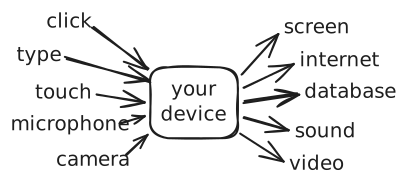
Every one of those arrows on the left is data going in. Every arrow on the right is data
coming back out — after code has manipulated it.
A few examples:
- You type on the keyboard → letters appear on the screen.
- You type a message and hit send → the software sends it out over the internet.
- Your friend’s device receives that from the internet → shows it on their screen.
- You press the unlock button on your remote → it sends an unlock command to the car.
- The car receives that unlock command → it physically unlocks.
Your device is running this same input → code → output loop, constantly, in every
direction at once.
Lessons
0/11
▸
View all lessons
Start lesson 1 →
○
What's the Output? #1
predict_output_game
○
What's the Output? #2
predict_output_game
○
What's the Output? #3
predict_output_game
○
What's the Output? #4
predict_output_game
○
What's the Output? #5
predict_output_game
○
What's the Output? #6
predict_output_game
○
What's the Output? #7
predict_output_game
○
What's the Output? #8
predict_output_game
○
What's the Output? #9
predict_output_game
○
What's the Output? #10
predict_output_game
○
What's the Output? #11
predict_output_game